Demand forecasting and inventory planning

Know which product to order, when, and how much

VidiStock reads your sales history, forecasts demand for the coming periods and gives an order suggestion for every product, with the calculation shown. Shelves stay stocked and cash stays out of the warehouse.

Data comes from CSV files or the Netsis, Logo, Mikro and DİA connectors (beta). Runs in the cloud or on your own server.

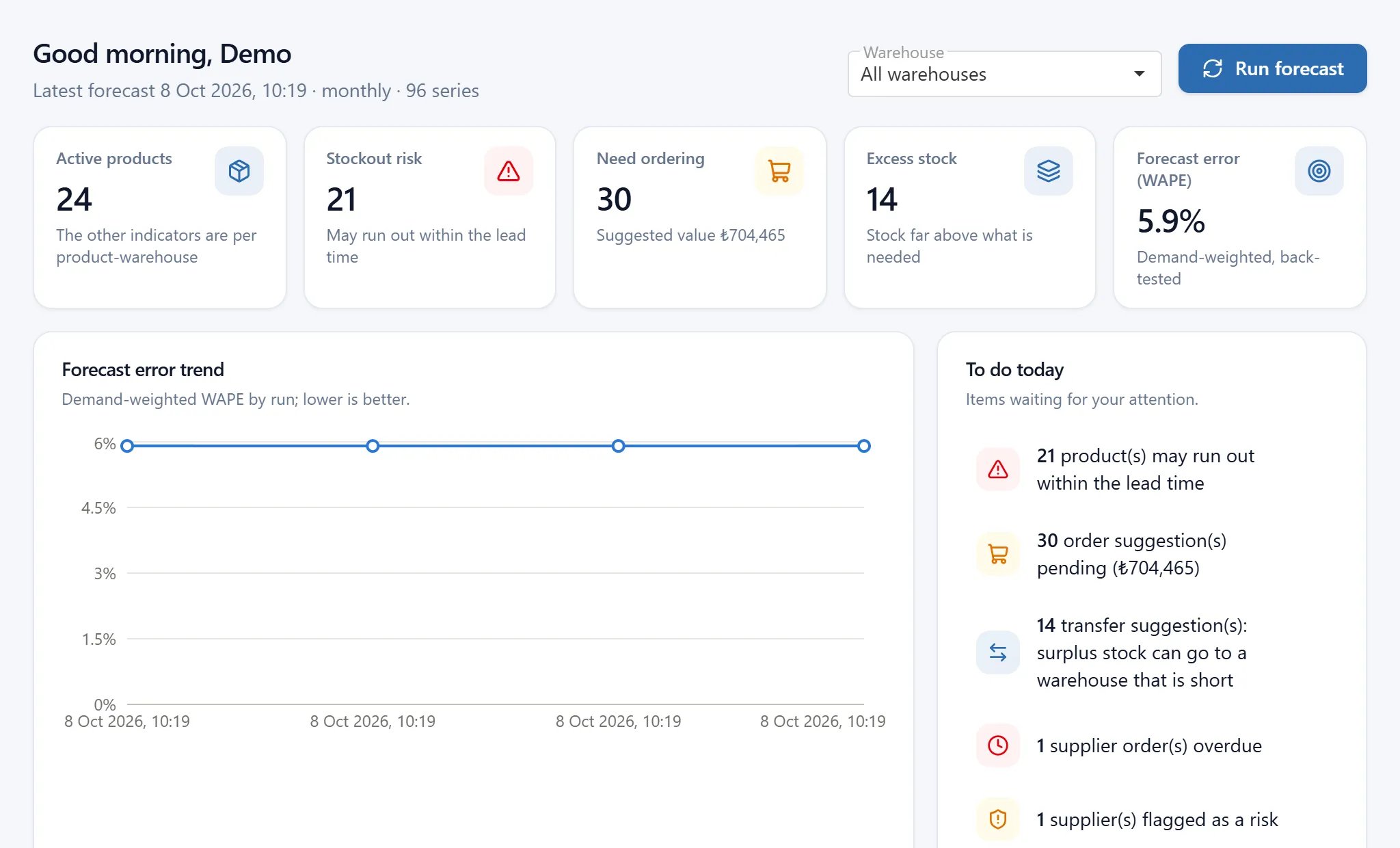
VidiStock dashboard showing stockout risk, pending order suggestions and the forecast error trend

Inventory cuts both ways

Hold too little and you lose sales; hold too much and your cash sits on a shelf. With hundreds of products and several warehouses, spreadsheets and intuition cannot keep that balance.

Too little stock
Empty shelves send customers elsewhere
Sales and reputation are lost
Rush orders cost more
Too much stock
Cash is tied up in inventory
Storage, insurance and spoilage costs grow
Slow items end up written off

How it works

  1. 01

    It takes your data

    Upload your products, sales history and current stock as CSV files, or pull them automatically through an ERP connector.

  2. 02

    It forecasts demand

    For every product and warehouse it tests several methods on past data, keeps the one with the lowest error and forecasts the coming periods.

  3. 03

    It tells you what to do

    It calculates safety stock and reorder points, lists the products that need ordering with quantity and value, and warns you about risks early.

Example

How an order suggestion is calculated

Water 1.5 L at the Ankara branch: about 12 bottles sell per day, the supplier delivers in 5 days, and 26 bottles are on the shelf. VidiStock does this calculation for every product in every warehouse, and shows its working.

26 bottles on the shelf against a reorder point of 97. The order is overdue.

The figures are an example. In the application, the "Detail" link next to every suggestion shows the same breakdown with your own data.

Demand during lead time5 days × 12 per day60
Safety stocka buffer against swings in sales and delivery37
Reorder point97
One month of demand30 days × 12 per day360
Target stock457
Stock on hand26
Net requirement431
Suggested orderrounded up to cases of 10440 bottles

Key features

Screenshots are taken from the application itself, running on sample data.

01

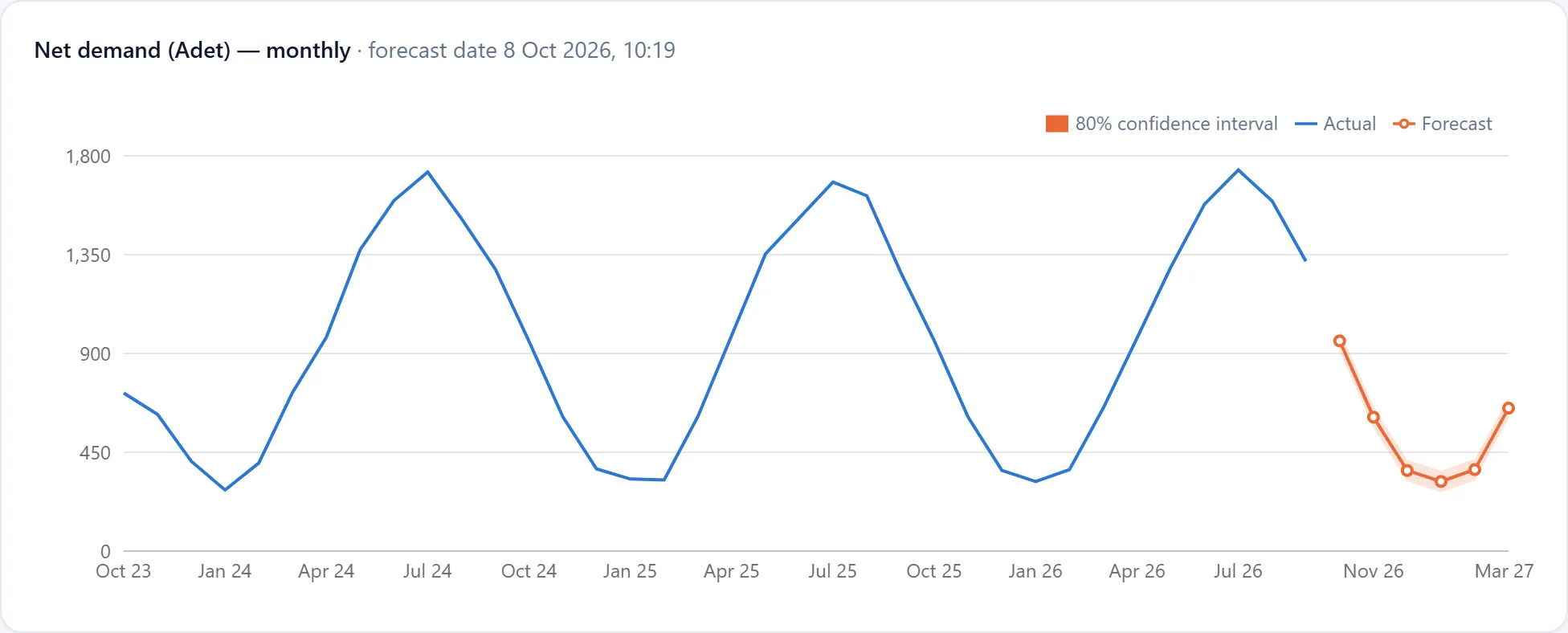
A forecast that fits each product

A steady seller and a spare part sold a few times a year should not be forecast the same way. VidiStock recognises the demand pattern, back-tests the methods and keeps the most accurate one.

  • Captures seasonality and trend on its own
  • Shows a confidence interval with every forecast
  • Reports forecast error per product instead of hiding it
Product detail with sales history, forecast and confidence interval chart
02

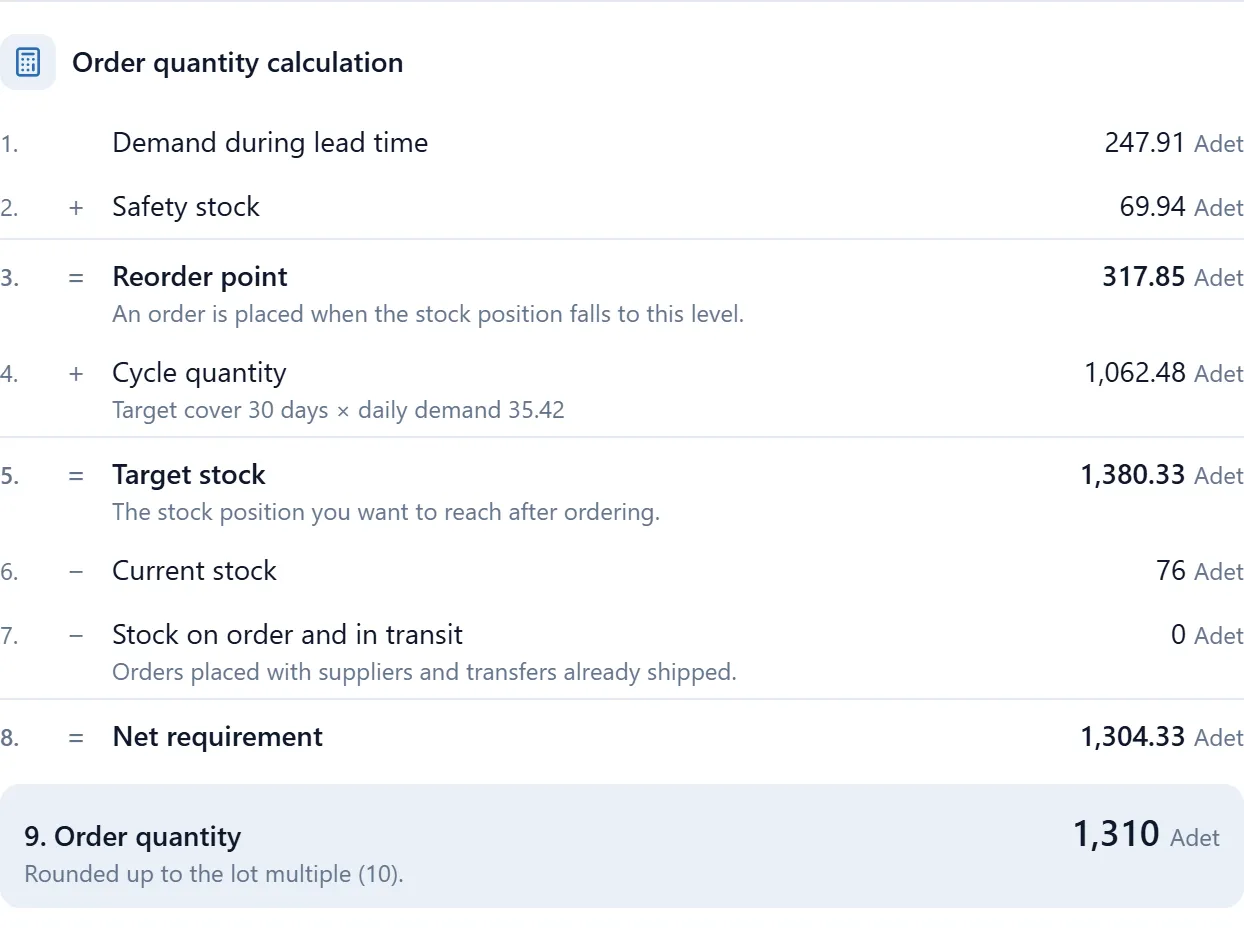
Not a black box: every suggestion is explained

Each order suggestion has a "Detail" link. The forecast, safety stock, reorder point and quantity are shown step by step, with your own numbers.

  • Rounds to minimum order quantity and lot size
  • Shows order value and holding cost
  • Exports the list to Excel
Order suggestion breakdown showing the safety stock and order quantity steps
03

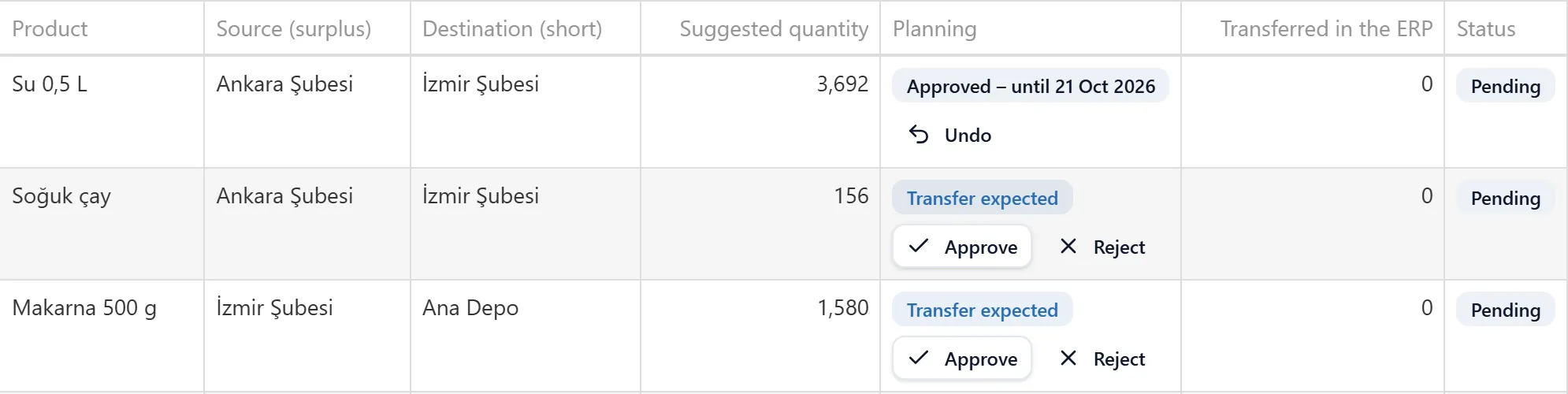
Multiple warehouses and branches

Every warehouse and branch has its own stock, forecast and order suggestions. VidiStock spots a surplus in one location and a shortage in another, and works out whether a transfer or a new purchase costs less.

  • Transfer and purchase are compared on total cost
  • An approved transfer is deducted from the purchase suggestion
  • Transfers are made in your ERP; VidiStock reads them and matches them to the suggestion
Stock transfers screen with transfer suggestions, planning approval and ERP status
04

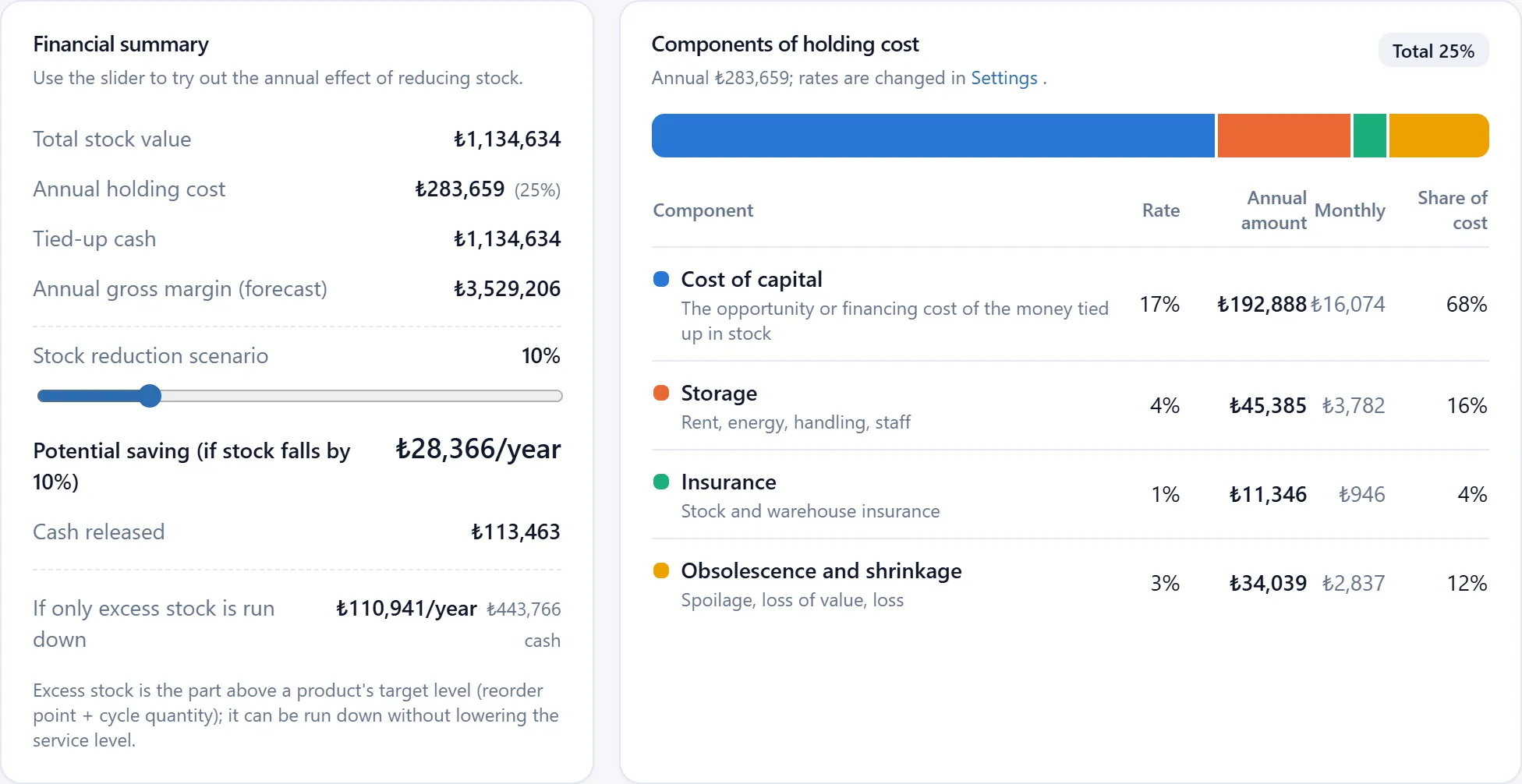
What your stock costs

How much cash is tied up in stock, what does holding it cost per year, and which products cost more to keep than they earn? See what a ten percent stock reduction would save, using your own data.

  • Tied-up cash and annual holding cost
  • Return on inventory and turnover
  • Fast, slow and dead stock
Stock financial analysis with tied-up cash, holding cost and a stock reduction scenario

ABC / XYZ analysis

Classifies products by value and by how regular their sales are, so effort goes to the products that matter most.

Supplier scorecard

On-time delivery, actual lead time, reject rate and price change; data to bring to a negotiation.

Customer concentration

Flags products whose sales depend on one or a few customers, so you see the stock at risk before that customer stops buying.

Alerts

Stockout risk, overstock, demand spikes, lead time drift and more, raised before the problem grows.

Roles

Administrator, planner and viewer; everyone does only what they are allowed to.

Turkish and English

Every user picks their own language. Files with Turkish headers and decimal commas are read as they are.

Works alongside your ERP

VidiStock does not replace your ERP; it takes data from it and tells you what to do. Connectors are read-only and never write to your ERP.

Beta connectors are still being validated on real customer installations; talk to us about a pilot.

SystemStatusScope
NetsisBetaProducts, sales, stock and purchasing data pulled automatically.
Logo Tiger / GoBetaTransactions from all fiscal periods, stock from the latest one.
MikroBetaSales, returns, stock and purchase orders.
DİABetaThrough its web service; no database access needed.
CSV fileAlwaysWhatever system you use, with a file exported from Excel.

In the cloud or on your own server

Cloud

Nothing to install; it runs in the browser. Each company's data is kept in a separate database.

On-premise

For companies that do not want their data to leave the building, the same application is installed on your own server.

Methods and sources

VidiStock's calculations are based on established inventory management methods. A source link for the general definition of each is given below; the details of the calculation in the application are explained in the documentation.

Exponential smoothing and seasonal methods
Demand forecasting for regularly selling products; for each product the method with the lowest error on past data is chosen. Source: Wikipedia
Safety stock
A buffer against uncertainty in demand and lead time; calculated from the target service level. Source: Wikipedia
Reorder point
An order is placed when stock falls to this level: demand during the lead time plus safety stock. Source: Wikipedia
Economic order quantity (EOQ)
The order quantity that balances ordering cost against holding cost. Source: Wikipedia
ABC analysis
Classifying products by value, so effort goes to the most valuable ones. Source: Wikipedia
Inventory turnover
How many times stock is renewed in a year; slow and dead stock are found with this measure. Source: Wikipedia

For products bought in a foreign currency, rates are taken daily from the forex selling rate published by the Central Bank of the Republic of Türkiye.

Frequently asked questions

We already have an ERP. Why would we need this?

An ERP records what happened: what you sold and what is in stock. VidiStock forecasts what will happen and tells you what to do about it. It works next to your ERP, not instead of it.

We already do this in Excel.

You can, but updating hundreds of products every week, accounting for seasonality and repeating it for every branch is a full-time and error-prone job. VidiStock does it automatically.

How accurate are the forecasts?

No forecast is exact, and VidiStock does not pretend otherwise. It measures forecast error on past data for every product and shows it; safety stock is calculated from that error. Products with high error are flagged.

How much history do we need?

Two or more years of sales history is ideal for capturing seasonality. It also works with less; simpler methods are used in that case.

Does it send orders to suppliers?

No. It produces a list of order suggestions that you export to Excel and send through your existing ordering process.

Is our data safe?

In the cloud, each company's data is kept in a separate database. If you do not want your data to leave your network, the application can be installed on your own server.

What does it cost?

We prepare a quote based on your number of products and warehouses and on how it is deployed. Fill in the demo request form and we will get in touch.

See it with your own data

Let us show you the application in a short call; if you like, we can try it with your own sales data.

Request a demo